Aspire Pixo Max Kit
Regular price:
product unavailable
 Description
Smart 2600mAh Pod Vape with Adjustable Power
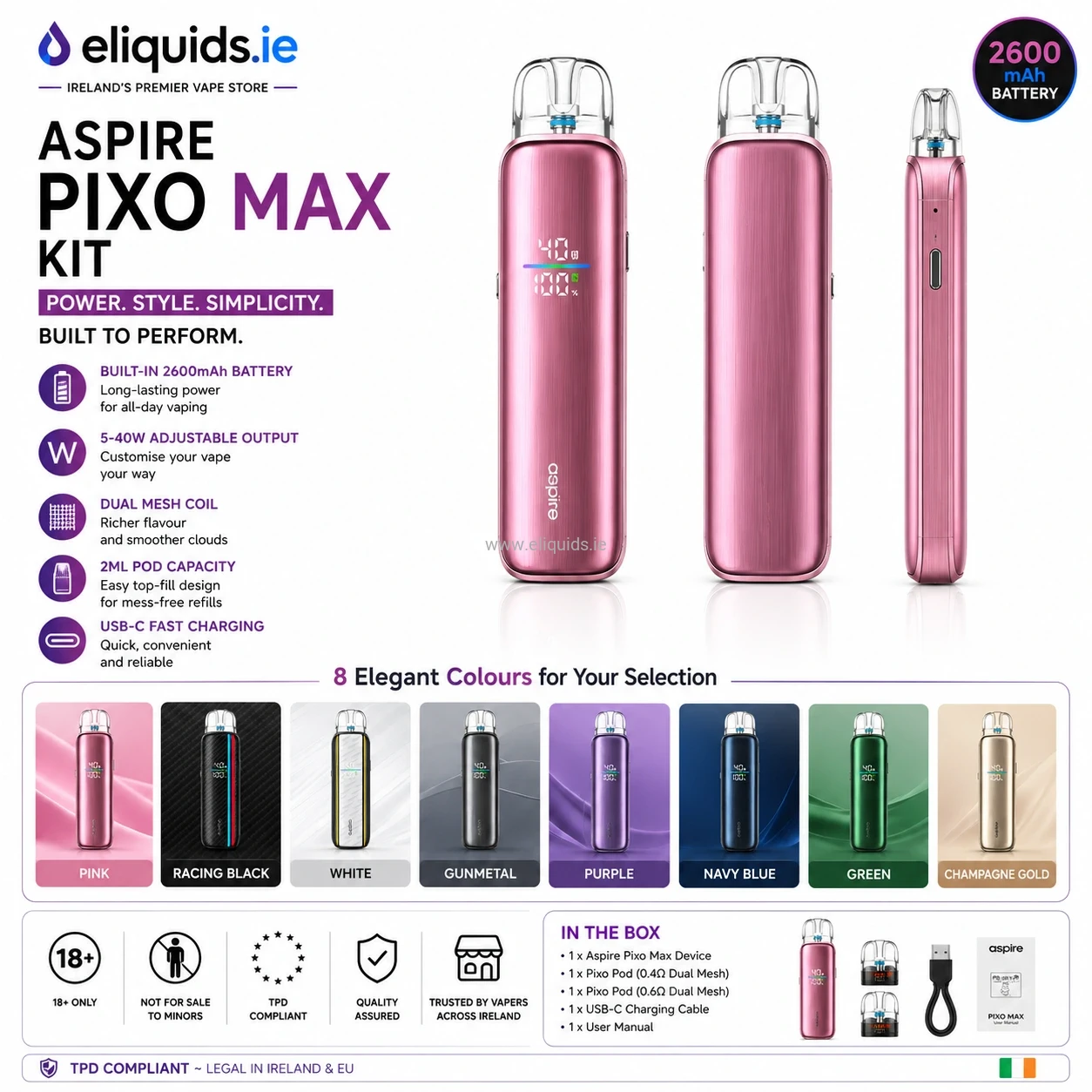
Aspire Pixo Max combines a powerful 2600mAh battery, adjustable airflow, dual mesh pod technology and three vaping modes in one compact refillable pod system.
Aspire Pixo Max Kit is designed for adult users who want more control, longer battery life and stronger performance than standard disposable-style pod devices. Instead of fixed output and limited airflow, Pixo Max allows users to adjust power delivery, choose different activation styles and fine tune the draw resistance depending on the installed pod.
The device supports the complete Aspire Pixo pod platform, including standard mesh and dual mesh pod options. Combined with adjustable airflow and three wattage levels, Aspire Pixo Max can be configured for smooth MTL vaping or stronger RDL performance depending on user preference.
Pixo Max uses a built-in 2600mAh battery, supports USB-C 2A charging and features a clear status interface showing resistance, battery level, power level and activation mode during use.
Main Features
- 2600mAh integrated battery
- Three adjustable wattage levels
- Three activation modes
- Adjustable airflow slider
- Compatible with all Aspire Pixo Pods
- Standard mesh and dual mesh pod support
- USB-C 2A charging
- LED status indicator interface
- Top-fill and side-fill pod options depending on pod version
Why Aspire Pixo Max Feels Different from Basic Pod Kits
Many compact pod devices focus mainly on simplicity, but often sacrifice battery life, airflow control and vapour consistency. Aspire Pixo Max was designed for users who want stronger daily performance without moving into large box-style vape devices.
The larger battery reduces charging frequency, while the adjustable airflow system allows users to choose between tighter MTL inhalation or a looser RDL draw. Combined with Aspire dual mesh pod technology, the device produces more even heating and improved flavour consistency during repeated use.
Swipe horizontally on mobile →
| Feature | Basic Pod Kit | Aspire Pixo Max |
|---|---|---|
| Battery Capacity | Usually 500–1000mAh | 2600mAh battery |
| Power Control | Fixed output | ECO / NORMAL / MAX |
| Activation | Usually auto-draw only | Auto-draw / Button / Combined |
| Airflow | Minimal adjustment | Adjustable side airflow |
| Pod Technology | Basic mesh | Standard Mesh & Dual Mesh Pods |
Technical Specifications
Swipe horizontally on mobile →
| Specification | Details |
|---|---|
| Battery | 2600mAh built-in battery |
| Charging | USB-C, 2A |
| Activation Modes | A Mode: Auto-draw / B Mode: Button activated / AB Mode: Auto-draw & button activated |
| Power Modes | ECO / NORMAL / MAX |
| Compatible Pods | Aspire Pixo Series Pods |
| Pod Capacity | 2ml TPD version |
| Filling System | Top fill or side fill depending on installed Pixo pod version |
| Airflow | Adjustable side airflow |
What Is Included in the Box
- 1 × Aspire Pixo Max Device
- 1 × Aspire Pixo Pod, Dual Meshed 0.4Ω or 0.6Ω, 2ml TPD version
- 1 × User Manual
Full Aspire Pixo Max User Guide
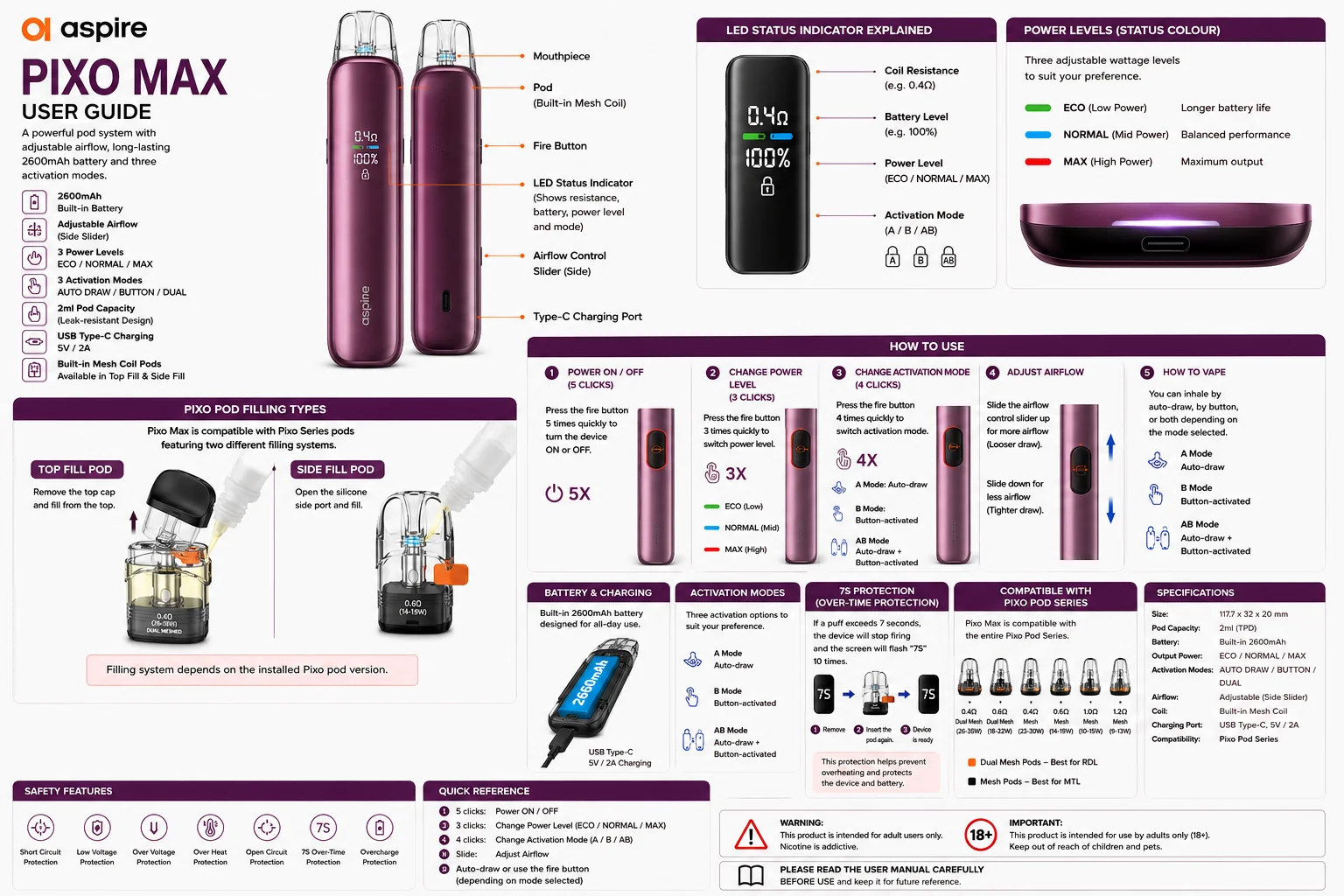
Use this visual guide when setting up the Aspire Pixo Max for the first time. The image explains pod filling, airflow adjustment, wattage modes, activation settings and compatible Aspire Pixo pod options.
How to Fill Aspire Pixo Pods
Aspire Pixo Max supports both top-fill and side-fill Pixo pods depending on the installed pod version.
- Remove the pod from the device if required.
- Check which filling system your pod uses.
- For top-fill pods, remove the top cap and fill from above.
- For side-fill pods, open the silicone side filling port.
- Insert the e-liquid bottle nozzle carefully.
- Fill slowly with compatible e-liquid.
- Do not overfill the pod.
- Close the top cap or silicone side seal firmly.
- Insert the pod back into the device.
- Wait 5–10 minutes before vaping with a new pod.
Always allow a new pod to absorb e-liquid fully before first use. This helps prevent burnt flavour and premature pod failure.
How to Turn Aspire Pixo Max On or Off
Press the fire button 5 times quickly to turn the device on or off.
- Turn the device off before carrying it in a pocket or bag.
- Store away from heat and direct sunlight.
- Do not expose the device to water.
How to Change Power Mode
Aspire Pixo Max allows users to switch between three performance levels.
Press the fire button 3 times quickly to change wattage mode.
Swipe horizontally on mobile →
| Mode | Performance Style | Best For |
|---|---|---|
| ECO | Lower power output | Longer battery life and cooler vapour. |
| NORMAL | Balanced performance | Everyday vaping. |
| MAX | Higher output | Warmer vapour and stronger performance. |
How to Change Activation Mode
Pixo Max supports three different activation systems.
Press the fire button 4 times quickly to switch between modes.
Swipe horizontally on mobile →
| Mode | Activation Type | Best For |
|---|---|---|
| A Mode | Auto-draw | Simple inhale activation. |
| B Mode | Button activated | Manual control. |
| AB Mode | Auto-draw + Button | Both activation options together. |
Compatible Aspire Pixo Pods
Aspire Pixo Max supports the complete Aspire Pixo pod platform including standard mesh and dual mesh versions.
Replacement pods are available here:
Swipe horizontally on mobile →
| Pod Type | Resistance | Wattage Range | Filling Style | Recommended Liquid |
|---|---|---|---|---|
| Dual Meshed Pod | 0.4Ω | 25–35W | Top fill | 70VG/30PG or selected 50/50 liquids |
| Dual Meshed Pod | 0.6Ω | 18–22W | Top fill | 50/50 or 70VG/30PG depending on airflow setting |
| Mesh Pod | 0.4Ω | 23–30W | Side fill | 70VG/30PG or selected 50/50 liquids |
| Mesh Pod | 0.6Ω | 14–19W | Side fill | 50/50 liquids |
| Mesh Pod | 1.0Ω | 10–15W | Side fill | 50/50 nicotine salts or 50/50 freebase e-liquids |
| Mesh Pod | 1.2Ω | 9–13W | Side fill | 50/50 nicotine salts or higher-strength 50/50 MTL liquids |
Safety Protections
- Over-time protection
- Short circuit protection
- Low voltage protection
- Over voltage protection
- Overcharge protection
- Overheat protection
- Open circuit protection
Ireland & TPD Information
Aspire Pixo Max uses refillable pod systems suitable for the Irish and EU TPD market when supplied in 2ml format.
This product is intended for adult users only (18+).
This device may be used with nicotine-containing e-liquids. Nicotine is a highly addictive substance.
Frequently Asked Questions
How do I turn Aspire Pixo Max on or off?
Press the fire button 5 times quickly to turn the device on or off.
How do I change power mode?
Press the fire button 3 times quickly to switch between ECO, NORMAL and MAX modes.
How do I change activation mode?
Press the fire button 4 times quickly to switch between auto-draw, button and combined activation modes.
Does Aspire Pixo Max use top-fill or side-fill pods?
Both types exist in the Aspire Pixo pod platform. The filling method depends on the installed pod version.
Can Aspire Pixo Max use nicotine salts?
Yes. Higher resistance pods such as 1.0Ω and 1.2Ω work well with 50/50 nicotine salt e-liquids.
Which pod produces the strongest vapour?
The 0.4Ω Dual Meshed pod is the strongest option for warmer RDL vapour production.
How long should I wait after filling a new pod?
Wait approximately 5–10 minutes before vaping so the cotton absorbs e-liquid fully.
Last Updated: May 2026
Safety
Related products
Aspire PIXO Replacement Pods 2 Pack